Quick Start - Karttahimmeli
This is a short guide for what to do when an alert comes in and an operation must be started quickly.
Getting started
Karttahimmeli can be used either with a web browser or with an iPhone or Android application. The map functions and user interface are the same in all usage methods.
Only the app can continue sharing location in the background when the screen is off!
Web browser – The web version is available at karttahimmeli.netlify.app and works with any browser. When using location sharing via browser, start the app and wait until location accuracy is good enough and the coloured dot showing your location is in the right place on the map before calling command — the data connection may not work during a call.
Android app – Download from Google Play. On Android, battery optimization must be turned off, as it often prevents background location after a few minutes. When the battery drops below ~15%, location accuracy may deteriorate — connect a power bank in time.
iPhone app – Download from the App Store.
PWA / home screen install – If you prefer not to install the native app, Karttahimmeli can be added to the home screen as a Progressive Web App. Map caching works better than in a plain browser. iPhone: Share → Add to Home Screen. Android Chrome: Menu → Add to home screen.
For search teams: six actions before field deployment
- Open Karttahimmeli - app or browser at karttahimmeli.netlify.app
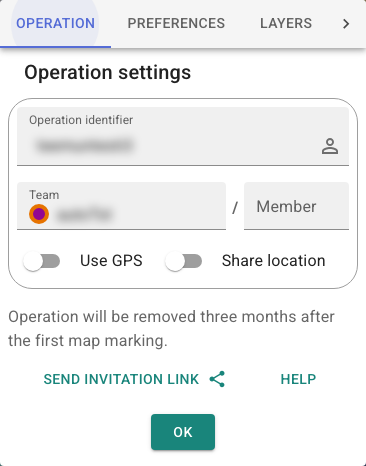
- Enter operation ID - get it from command post or QR code
- Set team name according to command instructions, and set your member ID to, for example, your initials
- Check battery optimization - on Android, disable power saving
- Do not start location sharing before name is correct
- Browse through the operating area's maps - this way the maps are ready and cached
For command: starting operation
- Create operation by entering new ID (avoid guessable IDs)
- Take ownership immediately via icon next to operation ID
- Write ID or print QR code visibly at command post
- Instruct search team naming before search teams leave
- Consider password if media or outsiders are present.
- Set a password and also give ownership to the deputy commander after the operation. Share the password with team leaders if needed for the after-action review.
Quick help for problems
| Need | Guidance |
|---|---|
| Cannot join operation | Check ID spelling. Upper/lower case does not matter, spaces do not matter |
| Map does not move | Centre mode is active. Press centre button again |
| Markings not visible | Filter may be active (button greyed out) - check observation log |
| Location sharing not working | Android: turn off power saving, or you're using the web browser |
| Map is slow/empty | Browse area to load map cache |