Naming Search Teams and Areas
A good naming convention is one of the most important practices when working in a shared operation. Search team name is shown in all entries, location history, and filters at command. Without a consistent convention, command post has difficulty understanding situation, and filtering different resources into view becomes needlessly difficult.
Team ID

Team ID is set when joining operation. Command should define naming convention before search teams start marking or sharing location.
Team ID field structure
The team ID consists of two parts, entered in separate fields:
| Field | Length | Example |
|---|---|---|
| Team | 2–12 characters | Dog-03 |
| Member | 1–6 characters (optional) | tk |
The fields are automatically joined with a slash: Dog-03/tk.
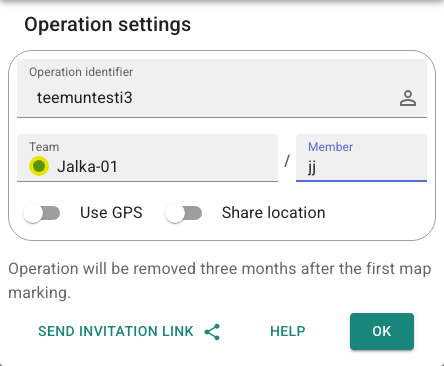
The member field is optional. If there is only one Karttahimmeli user in a search team, the member field can be left empty.
Dog's name as member ID
In a dog team, a convenient member ID can be the dog's name, e.g. Dog-03/Sesse.
This way markings directly show whose dog's observation it is.
The tracker automatically copies the team ID used on the device, so the
dog's marker and the handler's markings stay in the same team.
Another approach is to mark the team's dog member with, for example, a
/k9 identifier.
Principles of good team name structure
1. Use descriptive prefix, not single letters
| Recommended | Avoid |
|---|---|
Dog-01 |
D1 |
Foot-03 |
F3 |
Car-02 |
C2 |
Single letter is ambiguous and may match many unrelated names in search.
2. Use zero-padded numbers
Why zero padding?
With filter search, Foot1 matches Foot-1, Foot-10, Foot-11, etc.
Foot-01 matches only values containing 01, not 10 or 11.
Use Foot-01, Foot-02 ... Foot-10 instead of Foot1, Foot2 ... Foot10.
Karttahimmeli automatically pads the number to two digits for you: if you type
Foot3 as the team ID, it becomes Foot-03 once you leave the field. So
Foot-3 is no longer possible as a team ID as such.
3. Separate search team members using the Member field
If multiple people in same search team use Karttahimmeli, routes get mixed if they have exactly the same ID.
Enter the team name in the Team field and own initials in the Member field:
Team: Dog-03   Member: tk  →  Dog-03/tk
Team: Dog-03   Member: ah  →  Dog-03/ah
Then searching Dog-03 shows all members of that search team — and the
team shortcut buttons automatically group them under a single button.
Start only after ID is known
Do not start markings or location sharing before you know command-approved ID. Wrongly named entries are almost impossible to fix afterwards.
Area naming
Same principles apply to area naming as apply to team IDs:
- Use zero-padded numbering:
A01,A02notA1,A2 - In phase naming use two letters rather than one:
AA,AB - Area name does not need method (e.g.
sweep), put that in extra info
Extra info for areas
Area extra info can include for example:
- Search Team instructions: "Start from north, pay special attention to ditches"
- Search Team after-action comments: "Area covered, snow was up to mid-calf"
Remind search team about extra info
It is good to mention separately to team lead if area has instructions in extra info. Otherwise they may be missed.