Additional instructions for the iPhone app
The Karttahimmeli iPhone App is available on the App Store!
There is an app for iPhone that makes it possible to send your own location even while the screen is off. Using the app is strongly recommended, since the map cache in the browser either doesn't work at all, or is too small to be of any real use.
The Karttahimmeli app can be found on the
App Store 
The screen stays on
The Karttahimmeli app keeps the iPhone's screen on while the map is in use. The screen dims after about 30 seconds since the last touch, but doesn't turn off completely. This is intentional: the map stays visible without constantly having to wake the screen.
Apple iPhone instructions
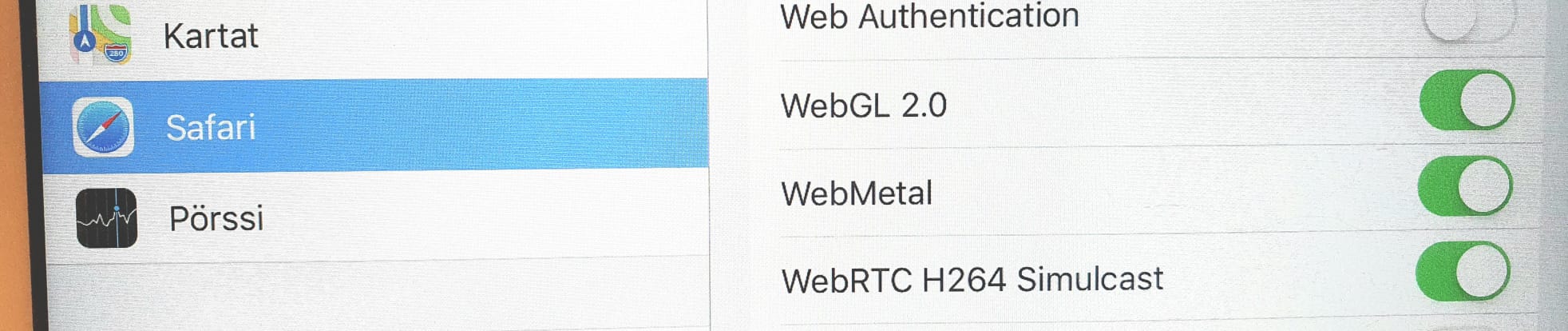
On older iPhones and iPads, it's worth making sure WebGL is enabled in
Safari. The setting can be found here: Settings->Safari->Advanced. Enable
WebGL 2.0 and WebMetal (or WebGL via Metal). On newer phones these are
already enabled.
For beta testers
The latest development version of the Karttahimmeli app is installed by first installing Apple's Testflight app from the App Store. After that, you can join as a Karttahimmeli beta tester via this link: https://testflight.apple.com/join/sm8MxAyB