Location Sharing
Sharing your own location
Location sharing means others in operation can see your position in real time. It is one of the most important Karttahimmeli features for shared situational awareness.
Location sharing is started from dedicated share button (not from the same switch as own location display).
Before starting sharing
Before enabling sharing, verify team ID follows command naming guidance. Incorrectly named location data significantly complicates command work.
Location trail - tail
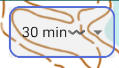
Tail is only a view
Changing tail length affects only what is visible on map. It does not remove stored route history from system.
Location sharing records your route. On map route is shown as tail, a line indicating where you came from.
Tail length can be adjusted in settings:
- Default: 30 minutes - often enough for search team work
- Dog search team recommendation: at least 4 hours - to notice when you cross old tracks
- Backtracking: full trail - set tail long enough to show full route
Who should share location?
Advanced: sharing to a layer
Location can be shared to separate layer instead of all users. This can be used in training where participants should not see each other's positions. See Layers guide.
Multiple people in same search team can share location. In a dog team, it often makes sense that both handler and assistant share.
If two people in same search team use exactly same ID, their routes mix. Separate search team members with slash. See naming conventions.
Power saving
On Android, power-saving mode can stop location updates when display turns off. Karttahimmeli warns about this with yellow notification.
Power saving must be disabled so background location works when screen is off. Check phone power settings if this fails.
Nearby search teams on map
Tip for dog teamss
Dog air-scent reaction can be caused by nearby search team. If people are upwind, dog may react to their scent. Checking nearby search team positions on map can save significant time.
At wider zoom level you can see other search team positions. Search Team tail shows from which direction they came.
It is not recommended to keep wide zoom all the time because it disrupts your own work. But it is good to occasionally check wider picture, especially before dog team starts a search.