Map Printing
Print tool
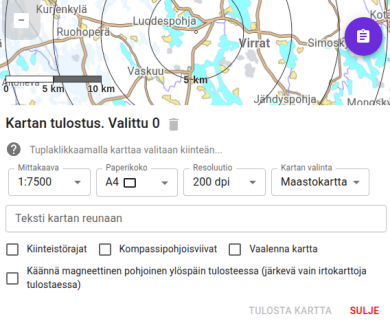
Karttahimmeli has built-in print tool that respects active filters. You can print, for example, map showing only selected patrol areas.
Printing is opened from map view: first select desired map and filters, then open print tool.
Selecting print area
Print area is selected from map in two ways:
- Single map sheet: click desired location and print area centers there. Click same location again to remove selection.
- Grid: double-click creates map grid automatically, then expand by clicking neighboring cells. Good for larger command wall map.
Grid and north-up orientation
Grid selection works only when map is in normal (not rotated) orientation. With magnetic-north rotation, grid cells become skewed.
Scale and print settings
Print at correct scale
Always print at 100% size, not "fit to page". Many printers default to fit-to-page, which shrinks map and breaks scale.
Top text ("This area is not printed") is only a reminder of printer margins, it does not appear on actual print.
Before selecting print area, you can set:
- Scale - for example 1:10,000
- Paper size - A4, A3, etc.
- Magnetic north up - map rotates so magnetic north is at top
Recommended settings for patrol map
- Map: Mapant or terrain map
- North lines: yes (magnetic)
- Property boundaries: not recommended (can mislead in terrain)
- Map lightening: consider if there are many markings
Command wall map
For command post, larger grid map can be printed:
- Select larger paper size (A3 or multiple A4 sheets)
- Double-click and expand grid as needed
- Add comment text (for example command post number or operation ID) which is printed at bottom of map
Printing can be repeated as operation progresses so map reflects latest entries.
Search and addresses in printing
Before printing, verify map is centered to correct location. Address search is behind magnifier button. Enter street address or place name and map moves automatically.
Coordinate search
Search field also accepts coordinates in multiple formats (WGS84 decimal degrees, degrees and minutes). Karttahimmeli tries to detect format automatically.