Layers
Layers are separate "containers" inside operation where markings, areas, and plans can be stored. By default everything goes to default layer, visible to all users.
Layers are an advanced feature
Layers are not required in normal search operations. In basic operation, default layer is enough. Consider layers only when basic usage is already familiar.
Why use layers?
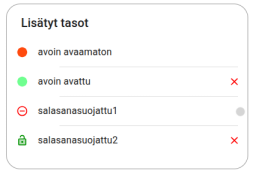
Layers allow for example:
- Planning layer: command prepares next phase plans in separate password-protected layer. Plans are published to patrols at right time.
- Training layer: role players in exercise share location on own layer that participants cannot access.
Creating a layer
- Open Layers menu
- Enter layer name
- Set password (or leave empty for open layer)
- Create layer
Creating layer does not activate it automatically
After creating layer, you must activate it separately by entering password again into "Enable layer" field. Otherwise new entries still go to default layer.
Creating entries on a layer
When multiple layers are in use, plus button asks which layer entry is saved to. If you want to save into specific layer, first verify that layer is selected as default for new entries.
Location sharing and layers
When sharing location, check carefully which layer sharing uses. If sharing was started to wrong layer, it cannot be switched live. Stop sharing and start again on correct layer.
Password-protected layer
In password-protected layer, entries and locations are visible only to users with password. User without password sees layer name but not contents.
Password-protected content is shown on map with orange border.
Open layers
Anyone in operation can join open layer (no password) by submitting empty password. This opens all open layers at once. Open layers can be used to separate patrol plans without secrecy.
Hiding layers
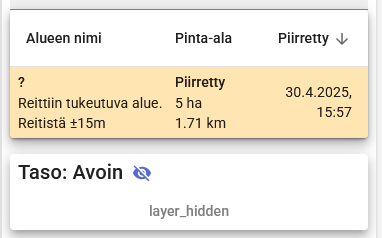
Layers can be hidden or shown one by one from list. Hiding is useful when map becomes cluttered with content from many layers.
Training scenario with layers
Training organizer can create secret planning layer for exercise tasks or scenario items to be found. Participants see only default layer, so scenario stays hidden until organizer decides to reveal it.