Operations
What is an operation?
In Karttahimmeli, operation is an identifier that binds all entries of one search or mission together. It is like a closed "map deck" that all patrols of the same mission join.
Patrols in different operations do not see each other's entries, even if they use same system.
Operation ID
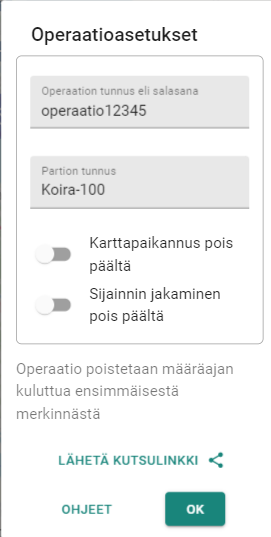
Operation ID is free-form text used to identify operation. When everyone uses same ID, they see same map with same entries.
Writing operation ID:
- Upper/lower case are equal (
SEARCH=search) - Spaces and punctuation are ignored (
Search 1=search1) - Only letters and numbers are considered
This means ID is interpreted correctly even if written by hand on board or told by phone with minor formatting differences.
Choose ID carefully
Avoid easily guessed IDs such as date or city plus task type
(search-tampere-15-2). Karttahimmeli has been visible in media, so
outsiders may try to guess operation IDs.
Good ID: two random words, or word + non-date number.
Creating an operation
Operation does not need separate setup. Type operation ID in field and join. If operation does not exist yet, it is created automatically.
Who can create operation?
Anyone can create operation by typing ID. There is no strict hierarchy, which enables quick startup.
In real incidents, still check first with command whether operation already exists and what official ID is.
Sharing operation ID
Most common method is writing ID visibly at check-in point. ID can also be shared as:
- QR code (printed or shown on screen)
- Link (sent by message)
- Phone call (dictated)
Because letter case is ignored, dictated ID works even if listener types it with different case style.
Tip for command staff
QR code is easy to print to A4: open operation in browser and press Ctrl+P. Printable view includes both text ID and QR code.
Operation ownership
Advanced: ownership
Operation owner manages operation settings, such as password and other owners. If password is set, only users with password can join.
Ownership is managed via person icon next to operation ID field. Sign-in requires Google account.
In real operation, command level should take ownership as early as possible. This prevents accidental ownership or password setting by individual searcher.
Benefits of ownership:
- Prevents outsiders from setting operation password
- Allows adding password protection later
- In password-protected operation route history is visible 9 days back (without password 7 days)
Operation password protection
Password protection is needed if outsiders are suspected in operation. After setting password, already joined users without password are automatically removed from operation.
Shared password for trainings
In association trainings, you can pre-agree one shared password used in all trainings. This makes password protection easy to enable without separate negotiation.