Markings
Why mark observations?
Mark boldly
Do not skip marking because you are unsure of significance. Mark it and set importance to Trivial. It stays in system but does not clutter command situational picture.
In field, observations should be marked immediately, not only after return to command post. Reasons:
- Location is known for sure, later exact place is hard to remember
- Timestamp is stored automatically
- "One person's trash is another person's treasure": low-value observation for one patrol may be decisive for another
Creating a new marking
Marking is added with plus button, then observation type is selected.
When own location is enabled, marking is automatically placed at GPS location. With gloves, there is no need for precise tapping.
Observation types
Other is most flexible
In practice, Other can be used very broadly. It fits observations that are difficult to classify into other categories.
Karttahimmeli has six point observation types:
| Marking | Use |
|---|---|
| Person | Observed or suspected person |
| Item | Found item or track sign |
| Dog reacts | Dog reaction (including air scent reaction) |
| Direction | Heard or seen event in specific direction |
| Command post | Command post location |
| Other | Everything else |
Marking importance
Each marking can be assigned importance:
| Importance | Meaning |
|---|---|
| Very significant | Call command immediately. Affects search direction. |
| Normal | Reportable observation, contact command by judgment |
| Trivial | No immediate search impact, but stored |
Trivial markings are shown faded on map and do not clutter situational picture, but they stay stored for later review.
Very significant = call command
If you mark observation as very significant, call command immediately. Karttahimmeli entry alone is not enough. Command has other tasks and may not monitor map in real time.
Direction arrow
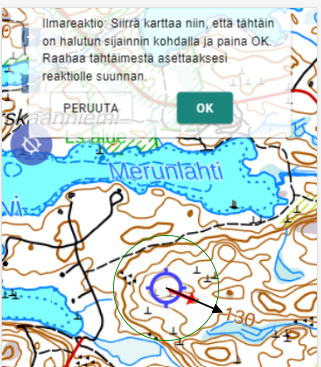
Direction arrow can be added to observation, for example from where sound came or where track continued. Arrow is added while creating observation.
If phone compass works, you can point phone to direction and save automatically. Otherwise direction is set by dragging arrow from crosshair.
Saving and network connection
Offline use
Karttahimmeli also works without network. Markings are stored locally and sent automatically when connection returns. Do not close app in forest only because network is down.
Marking is first saved locally and sent to server as soon as network is available. Spinning icon on marking means upload is in progress.
Reviewing markings
By tapping a marking you can view:
- Timestamp
- Patrol name
- Extra info and comments
- GPS accuracy at marking time
- Wind data from nearest weather stations
Wind data is stored automatically. This is especially useful for dog patrol post-analysis.